Resume Tips: Expert Advice for Writing a Resume That Actually Gets Results
Want to write a resume that gets you interviews? You need more than a clean template and a list of job duties. You need strategic positioning, compelling content that proves your value, and the confidence that every word is working hard to get you noticed.
Table of Contents
These resume tips come from years of certified professional resume writing—the same expertise built into Paige. Whether you're DIY-ing your resume or letting Paige handle the strategy, these insights will help you create a document that opens doors.
The 10 Most Important Resume Writing Tips
Expert guidance from certified resume writers
Ready to Transform Your Resume?
Paige automatically applies all of these tips when you upload your resume
Get Started with Paige1. Content Over Design—Don't Let Visual Elements Hijack Your Message
Columns look pretty. Icons add visual interest. Graphics feel modern. But they all come at the expense of robust content—and they often can't be read by applicant tracking systems.
The problem with design-heavy resumes:
- ●Columns force you to fragment content unnaturally
- ●Icons and graphics waste valuable space that could showcase achievements
- ●Creative layouts often fail ATS parsing, meaning your resume never reaches human eyes
- ●Design becomes a crutch for weak content
The solution: Use a clean, simple format that lets your accomplishments speak for themselves. Professional doesn't mean boring—it means strategic.
How Paige helps: Paige uses one professional template optimized for both ATS and human readers. No decisions about columns or colors or icons—just clean formatting that puts your content front and center. You spend energy on what you say, not how it looks.
2. Protect Your Privacy—Skip Your Full Street Address
Including your full street address is outdated and unnecessary. Hiring managers only need to know your general location, and listing your complete address exposes you to identity theft risks.
What to include: City, State (e.g., "Washington, DC" or "Brooklyn, NY")
What to skip: Street address, ZIP code, other personal details
Also remove:
- ●Date of birth or age
- ●Marital status
- ●Photo (unless standard in your industry/region)
- ●Social Security number (never put this on a resume)
How Paige handles this: When you upload your resume, Paige automatically strips out full street addresses and flags any other personal information that shouldn't be there. Your privacy is protected by default.
3. Choose a Dominant Narrative—Your Resume Is a Marketing Device
The biggest mistake people make? Trying to include everything they've ever done. Your resume isn't a comprehensive career history—it's a targeted marketing document.
Ask yourself: Who is your audience? What do they need to see to bring you in for an interview?
If you're targeting senior operations roles, your resume should emphasize strategic leadership and process improvement. If you're pursuing data science positions, lead with technical skills and quantifiable analytical impact. Don't dilute your narrative by trying to be everything to everyone.
How Paige helps: When you upload your resume, Paige immediately identifies your dominant professional identity and helps you organize content around that narrative. Through the Paige Resume Builder, Paige asks targeted questions about what you're trying to accomplish with this resume, then helps you prioritize accordingly.
4. Use Your Professional Summary as Your Elevator Pitch
Your professional summary is the first—and sometimes only—thing hiring managers read. Don't waste it with generic platitudes like "results-driven professional seeking challenging opportunities."
Your summary should answer three questions:
- ●Who are you? (Your professional identity and level)
- ●What do you bring? (Your core competencies and experience)
- ●Why you? (What makes you particularly effective or valuable)
❌ Generic
"Experienced manager with strong communication skills"
✅ Effective
"Operations director with 12 years scaling infrastructure for high-growth startups. Led cross-functional teams of 20+ through two successful acquisitions, implementing systems that reduced operational costs by 30% while improving delivery speed."
How Paige helps: Paige generates your professional summary based on your most impressive, most relevant accomplishments. It's also the easiest place to tailor when targeting a new role—just tell Paige: "Rewrite my summary for a Chief Operating Officer position in healthcare."
5. Add Company Context—Show Scale and Scope
One of the biggest mistakes people make is assuming hiring managers understand their work environment. They don't. You need to provide context about where you worked, not just what you did there.
❌ Without context
"Led digital transformation initiative"
✅ With context
"Led digital transformation initiative for regional nonprofit serving 12,000 refugees annually across 6 program sites, managing $3M budget and coordinating with 40+ community partners"
The context tells hiring managers:
- ●The scale of your operation (12,000 clients, $3M budget, 6 sites)
- ●The complexity of your environment (40+ external partners)
- ●The type of organization (regional nonprofit focused on refugee services)
This information makes your accomplishments relatable and meaningful.
How Paige creates this automatically: When you upload your resume, Paige immediately adds company descriptions that include revenue, employee count, geographic scope, and core business. This context appears right under each company name, so hiring managers immediately understand the environment where you delivered results. You don't have to research this information—Paige pulls it automatically.
6. Own Your Achievements—Make Every Bullet Uniquely Yours
If the person who had your job before you or after you could use one of your bullet points on their resume, it's not specific enough.
❌ Too generic
"Managed social media accounts for the company"
✅ Uniquely yours
"Grew Instagram following from 3,200 to 28,000 in 14 months by launching video content strategy that generated 2.3M impressions and drove 4,200 website visits monthly"
The second version couldn't belong to anyone else—it has your specific metrics, your specific strategy, your specific impact.
How Paige helps: Paige puts placeholders exactly where you should add metrics and impact: "[Specific action] resulting in [measurable outcome] for [specific audience/stakeholder]." The Paige Resume Builder asks follow-up questions to help you flesh out vague bullets: "What were the specific results? How did this compare to previous performance? What made your approach different?"
7. Organize Important Roles Under Core Competencies
Instead of just listing bullet points chronologically under each job, organize your most important roles by core competencies. This demonstrates your expertise more effectively and makes it easier for hiring managers to see your strengths.
❌ Instead of:
- • Managed team projects
- • Developed new processes
- • Worked with stakeholders
- • Created training materials
✅ Organized by competency:
Team Leadership & Development
- • Built and led team of 12, including 3 direct reports and 9 cross-functional partners
- • Implemented mentorship program that improved retention by 40%
Process Improvement
- • Redesigned workflow, reducing turnaround time by 35% and eliminating 20 hours/week of redundant work
This structure makes your capabilities immediately clear and provides natural interview talking points.
How Paige does this automatically: When you use the Paige Resume Builder on a role, Paige asks questions to identify your main areas of impact, then organizes your bullets under competency headers. You don't have to figure out the structure—Paige creates it based on what you accomplished.
8. Humanize Yourself—Include Volunteering, Interests, and Special Skills
Your professional accomplishments get you in the door, but personal touches make you memorable and relatable. Don't skip sections that show who you are beyond your job title.
What to include:
- ●Volunteer leadership: Especially board positions, significant fundraising, or sustained commitments
- ●Special skills: Languages, technical certifications, unique expertise
- ●Relevant interests: Particularly those that demonstrate discipline, leadership, or teamwork (competitive athletics, serious hobbies)
What this achieves:
- ●Provides conversation starters in interviews
- ●Demonstrates values and priorities
- ●Shows you're a well-rounded person, not just a resume
- ●Can reveal shared interests with interviewers
Example from a real resume: "Former member of Team USA (1997 & 2001 World Squash Championships). Current member of defending champions in DC's premier squash league."
This signals discipline, competitive drive, sustained excellence, and teamwork—all professionally relevant qualities communicated through personal interests.
How Paige helps: Paige includes sections for Professional Affiliations, Volunteer Leadership, and Interests/Skills. The Paige Resume Builder prompts you to think about what humanizing details are worth including and helps you frame them professionally.
9. Streamline Older Work—Don't Let Your Resume Pile On
Nothing screams "I haven't edited this in years" like a resume where every role gets equal treatment, regardless of relevance or recency.
Your resume shouldn't look like you just kept adding content without ever removing or condensing anything. Work from 15+ years ago doesn't deserve the same space as your current position. Don't make hiring managers do the work of figuring out what matters.
The fix: Recent, relevant roles get full treatment with multiple detailed bullets. Older roles get condensed to 1-3 lines unless they're particularly relevant to your target position.
How Paige helps: Paige automatically applies this hierarchy, giving more space to recent experience and condensing older work. You're not starting from scratch trying to figure out what to cut—Paige shows you the strategic structure, and you refine from there.
10. Match Space to Interview Focus
Here's a simple test: Look at your resume and estimate how much interview time you'd want to spend discussing each section.
If your current role is the most directly relevant—in seniority, skills, and scope—it shouldn't occupy just 1/8 of your resume while 1/4 is dedicated to your college education and extracurriculars from 15 years ago. The space you dedicate to content signals what you consider most important.
Strategic space allocation means:
- ●Your most recent, most relevant role gets the most detailed treatment
- ●Sections you want to discuss in interviews get proportional space
- ●Content from 10+ years ago gets minimal space unless highly relevant
- ●Education moves to the bottom once you have 5+ years of professional experience
How Paige helps: Through the Paige Resume Builder, Paige walks you through each section and asks: "How important is this experience for the roles you're targeting?" Then Paige helps you allocate space accordingly, ensuring your resume reflects your actual priorities.
Why These 10 Tips Work—and Why They're Hard to Implement Alone
Each of these resume tips is grounded in what actually works: years of writing resumes for 250+ executives and senior professionals, understanding what hiring managers look for, and knowing how to position candidates strategically.
But here's the challenge: Knowing what to do and actually doing it effectively are completely different things.
You'll spend hours trying to figure out your "dominant narrative." You'll agonize over which older roles to condense and how. You'll stare at bullet points wondering how to make them more specific. You'll second-guess your professional summary seventeen times.
How Paige Makes These Tips Actually Actionable
Paige doesn't just tell you these tips—it applies them for you.
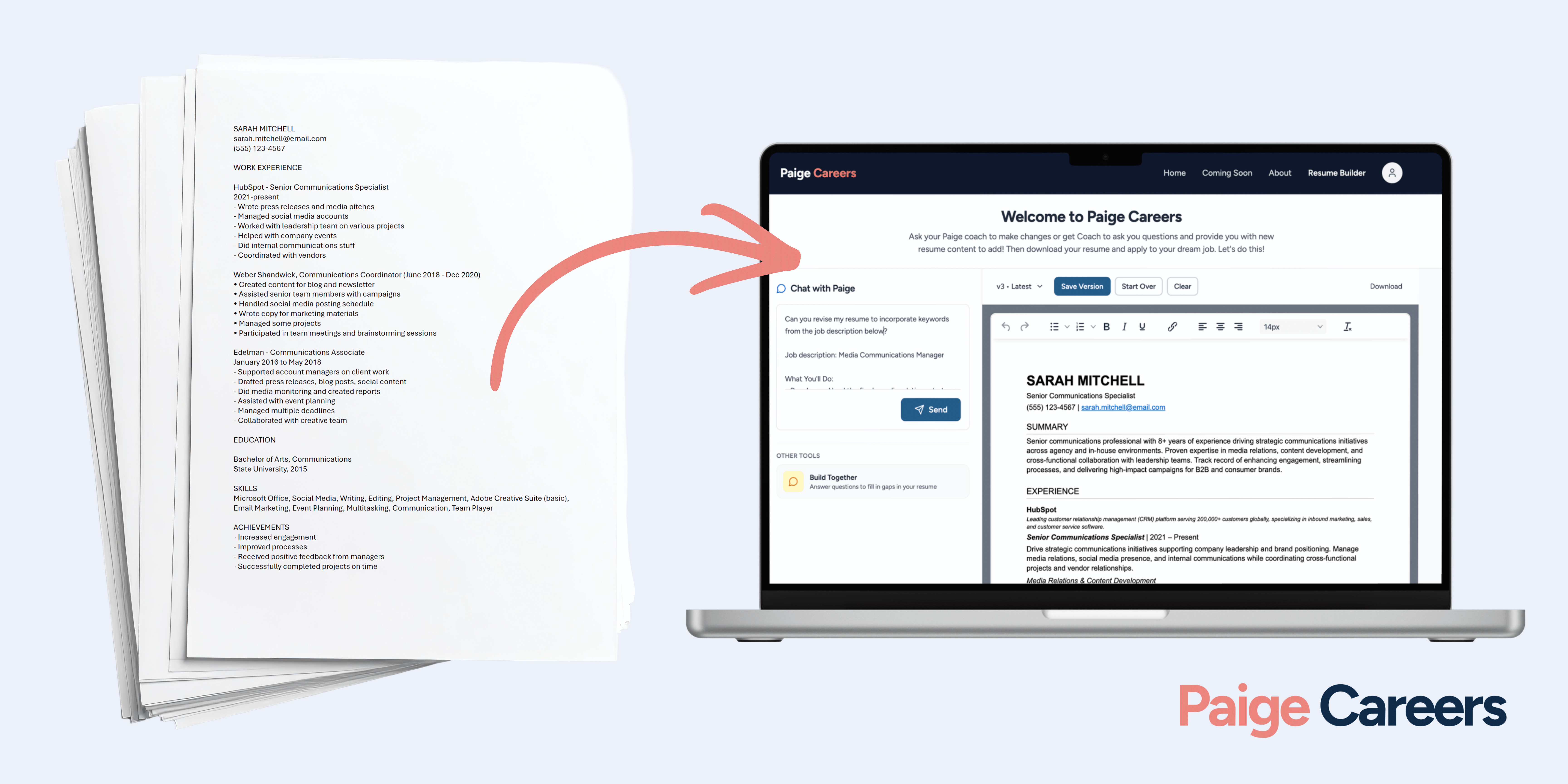
Getting started takes minutes:
Upload your resume or LinkedIn profile. Paige instantly reformats it, adds company context, protects your privacy by removing street addresses, and organizes content strategically.
Simple improvements through chat:
"Make my current role more prominent." "Condense my experience from 2010-2015." "Rewrite my summary for a COO position." Paige makes these changes immediately.
Strategic depth through the Paige Resume Builder:
Answer targeted questions about your experience, and Paige helps you:
- ●Identify your dominant narrative and organize content around it
- ●Make generic bullets uniquely yours with specific metrics and impact
- ●Organize roles under core competencies automatically
- ●Allocate space proportionally to interview relevance
- ●Humanize your resume with volunteer work and interests
Built-in privacy protection:
Paige automatically removes full street addresses and flags other personal information that shouldn't be on your resume.
Professional template that prioritizes content:
No columns, no graphics, no design decisions. Just clean formatting that works for ATS and human readers.
What You Get With Paige:
- All 10 resume tips applied automatically when you upload
- Strategic guidance through the Paige Resume Builder when you need depth
- Simple chat edits when you need quick changes
- Multiple versions for different roles (all auto-saved)
- Unlimited revisions and downloads
- Interview prep built in—the Paige Resume Builder asks questions hiring managers will ask
Think of it this way:
- ●These 10 resume tips give you the knowledge
- ●Our free resume template gives you the structure
- ●Paige gives you both—plus the strategic implementation that turns knowledge into a finished, compelling resume
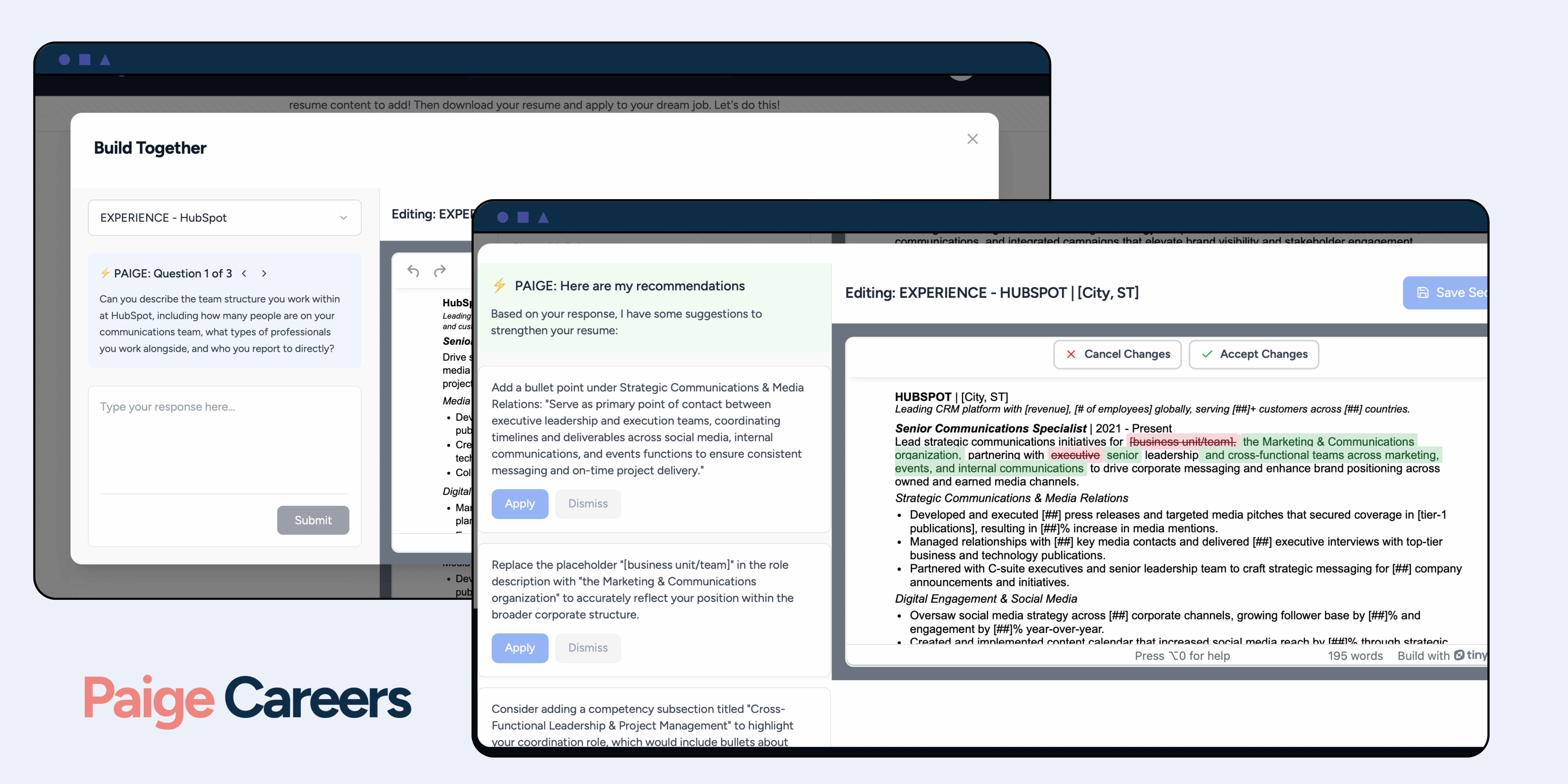
Paige Resume Builder: Strategic Questioning and Resume Coaching at Scale
Paige Resume Builder mirrors a one-on-one consultation with a professional resume writer. It lets you take a deep dive into a specific section of your resume—for example, your current role—providing specific, private-sector resume coaching. Through conversational AI, Paige asks strategic questions about your federal role that extract the information private-sector employers actually care about. For example, it may ask you targeted questions about your role, your team, and your impact to help you unearth key aspects of your experience. And then Paige makes specific, actionable recommendations that you can make to your resume. With a click of a button, you can apply those changes to your working draft.
The kinds of questions you are asked in the Paige Resume Builder are the types you might expect in an interview, or by a hiring manager who feels they're missing something when going through their resume. This means that the Paige Resume Builder is not only a bullet point generator, filling in key holes and strengthening your resume content—it is an interview prep tool that helps you anticipate the types of conversations you'll expect when you meet a live person.
Common Resume Mistakes to Avoid
Beyond the 10 core tips, watch out for these frequent pitfalls:
❌ Using Objective Statements
These waste valuable space telling employers what you want. Professional summaries demonstrate what you offer to them. The only time to include a sentence about your career goals is when you're making a major career pivot; this short sentence should be at the end of your Summary.
❌ Listing "References Available Upon Request"
This is outdated. Employers assume you have references and will ask when needed.
❌ Neglecting Your LinkedIn Profile
Your resume and LinkedIn should tell the same professional story. An outdated LinkedIn profile (or worse, one that contradicts your resume) raises red flags. Update both simultaneously.
❌ Using Buzzwords Without Evidence
"Innovative," "strategic," "results-driven" mean nothing without proof. Show what you led and what resulted.
❌ Spending Too Much Time or Money on Your Resume
In compressed job markets, networking is critical. Spending weeks perfecting your resume (or thousands on professional services) pulls energy away from the relationships and conversations that actually land jobs. Your resume needs to be strong enough to support your network—not perfect enough to replace it.
Some of the ways in which Paige helps you avoid these mistakes:
- ●Paige automatically uses professional summary format, never objective statements
- ●No outdated resume conventions built into the template
- ●Placeholders and Paige Resume Builder questions force specificity instead of buzzwords and to help you clarify your professional summary
- ●Most importantly: Paige gets you to a strong resume in under an hour, not 8-12 hours, freeing you up to focus on networking, applying strategically, and having conversations that actually lead to interviews
Resume Tips by Career Stage
Strategic guidance tailored to where you are in your career
Entry-Level & Recent Graduates
Just starting your career? You have more to offer than you realize, but you need to frame it strategically.
Mid-Career Professionals (5-15 Years)
Your challenge is showcasing depth while maintaining strategic focus.
Senior-Level & Executives
At senior levels, emphasize strategic leadership and organizational impact over tactical execution.
When DIY Resume Writing Isn't Enough
You've read the tips. You understand what makes a strong resume. Now the question is: Do you want to spend 8-12 hours implementing all of this yourself, or do you want Paige to handle the strategy, formatting, and optimization?
Why Professionals Choose Paige Over DIY
- ⏱️ Save 8-12 hours of frustrating work—get a professional resume in under an hour
- 🎯 Strategic expertise built in—Paige applies all 10 tips automatically
- ✏️ Unlimited revisions as you refine your positioning and target different roles
- 📝 Multiple versions for different industries or positions (all auto-saved)
- 🎤 Interview prep included—the Paige Resume Builder asks questions hiring managers will ask
- 💰 Professional quality without professional prices—$5.99/month vs. $1,900-$3,900 for traditional resume writing
For the price of lunch, you get:
- ●Professional template applied instantly
- ●Strategic guidance that mirrors a $2,000 resume writer
- ●Simple chat interface for quick edits
- ●Paige Resume Builder coaching for section-by-section depth
- ●Privacy protection built in
- ●Company context added automatically
- ●Unlimited downloads whenever you want
Most importantly: You'll feel confident submitting your resume instead of wondering if you missed something critical.
Your Resume Is Too Important to Leave to Chance
You've learned the 10 resume tips that actually work. You know what separates a strong resume from a generic one. Now it's time to decide: spend 8-12 hours implementing this yourself, or let Paige handle the strategy and execution?
Most professionals choose Paige because:
- ●They value their time at more than $2-3/hour (what DIY costs you)
- ●They want confidence their resume is working, not guesswork
- ●They need multiple versions for different opportunities
- ●They're preparing for interviews while building their resume
Or download our free template and do it yourself: Get Free Resume Template
Either way, make sure every word on your resume is working hard to get you that interview.
See why professionals trust Paige with their career transitions